Place to download free full versions of the latest software
and audio samples for free.
Homepage » Software » MacOS » Audio Tools » Audio Plugins » Expanded Softsynth Plugin for MONTAGE M v3.0.1 MAC
Download Expanded Softsynth Plugin for MONTAGE M v3.0.1 MAC

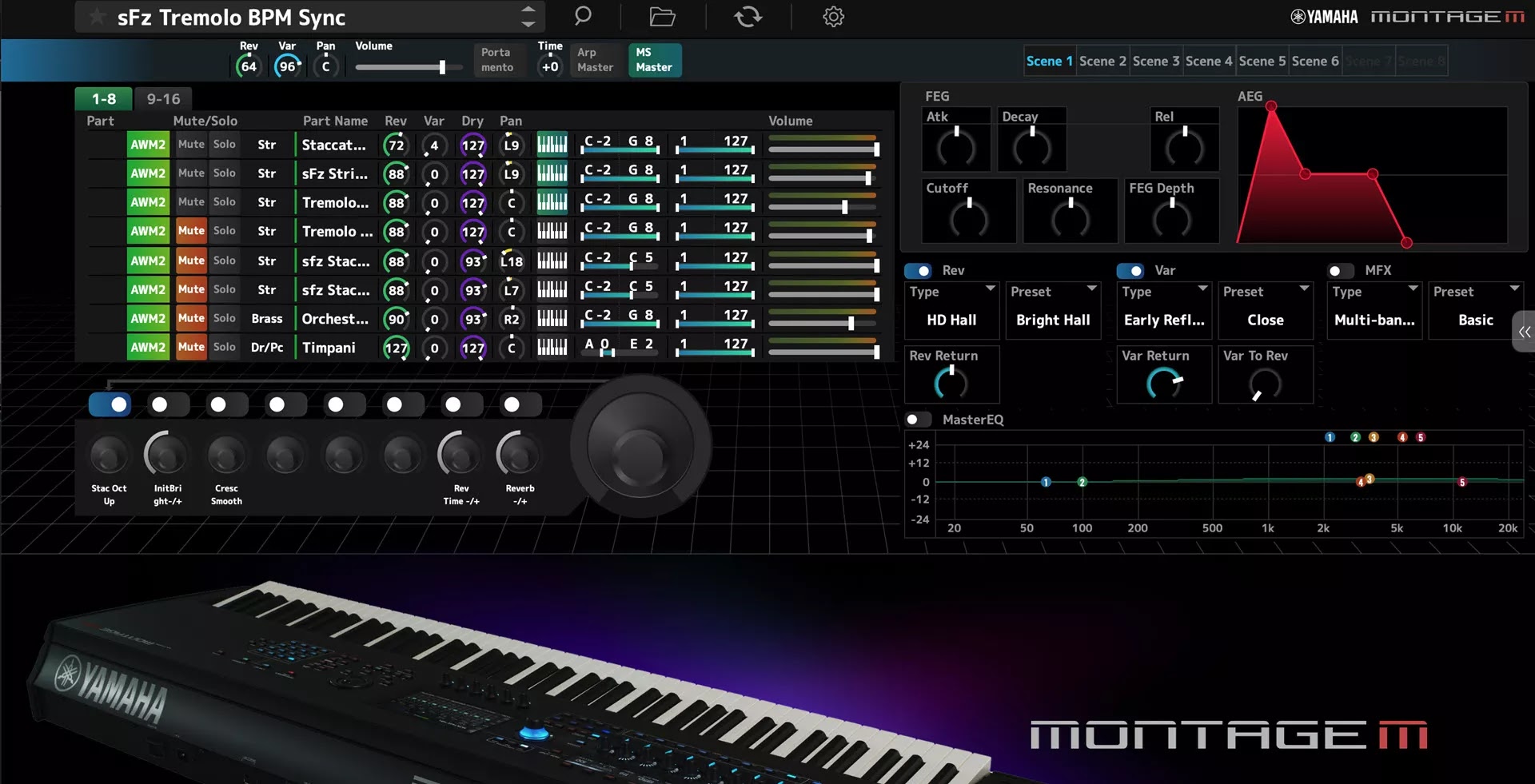
Expanded Softsynth Plugins for MONTAGE M (ESP) is the software for MONTAGE M Owner. ESP is not sold separately.

A game-changer for recording musicians, the Expanded Softsynth Plugin (ESP) replicates the MONTAGE M in your favorite DAW.

Free for all registered MONTAGE M owners, the ESP allows you to create, edit and mix MONTAGE M Performances anywhere you happen to be without the hardware.

No other competitor has this level of seamless integration.

Advantage of ESP (software)

  • Ultimate mobility - You can realize all of MONTAGE M just by laptop.
  • Ultimate Work Efficiency - Offline processing, rendering.
  • All settings are saved in your DAW project for easy totall recall.
  • Can be launched on any number of ESP as long as your PC specifications allow.
  • Can be edited more information on the large PC screen.
Expanded Softsynth Plugin for MONTAGE M v3.0.1 MAC

Download Expanded Softsynth Plugin for MONTAGE M v3.0.1 MACYamaha Corporation, Expanded Softsynth, VSTi Plugins, VST3 Plugins, AU Plugins, Synthesizer, 64 Bit Software, Team VR

Yamaha Expanded Softsynth Plugin for MONTAGE M v3.0.1 MAC-VR.rar
7.14 GB | Drive.google.com | Pass: www.4download.net
DOWNLOAD NOW
Yamaha Expanded Softsynth Plugin for MONTAGE M v3.0.1 MAC-VR.rar
7.14 GB | Mediafire.com | Pass: www.4download.net
DOWNLOAD NOW
Yamaha Expanded Softsynth Plugin for MONTAGE M v3.0.1 MAC-VR.rar
7.14 GB | Usersdrive.com | Pass: www.4download.net
DOWNLOAD NOW
Fake MailZ: Fake Email Generator

Comments 45

Respect yourself and others!


  1. Ay
    Ay
    28 February 2026 05:39
    I have installed steinberg from the official website, now the plugin shows in vst 3, but it says license not found, I tried using the patch in the installation, but "There has been an error.
    Error changing ownership of /Library/Application Support/Steinberg/Activation Manager/Steinberg License Engine.app to 0
    The application will exit now." PLEASE HELP WHAT DO I DO?
  2. berry
    berry
    28 February 2026 02:50
    extraction password does not work
  3. Patrick
    Patrick
    26 February 2026 04:07
    it requires extraction password, how can i get it
  4. bobster
    bobster
    23 February 2026 01:44
    For those on M series mac's, you have to disable SIP, then install it for it to work without crashing.

    There is also a method to get it to work without disabling SIP, but it takes a little more work:

    https://audiosex.pro/threads/codesigning-for-sip-enabled.74681/
    1. bobster
      bobster
      23 February 2026 01:45
      :)
    2. bobster
      bobster
      23 February 2026 19:19
      Better steps I Found:

      STEPS:
You can not turn it off. SIP
      You need to create your certificate and sign it on your own behalf
      I won't write how to create it, read it here, also read the latest comments
      https://audiosex.pro/threads/codesigning-for-sip-enabled.74681/

      After creating, you need 1 more additional certificate to become trusted
      direct link to it
      https://www.apple.com/certificateauthority/AppleWWDRCAG3.cer

      I'll leave you a command that just needs to be copied and pasted into the terminal, but you need to substitute your certificate into it
      instead of ???????????? your data.
      For the sake of example, I'll write mine
      sudo codesign --force --deep --sign "Apple Development: sanyprimer@gmail.com (RU11TR7A5KER)"
      Team


      function prep() {
      sudo xattr -cr "$1"
      sudo chown -R ${USER} "$1"
      sudo chmod -R 777 "$1"
      sudo codesign --force --deep --sign "Apple Development: ???????????????? @gmail.com (????????????)" "$1"
      }
      prep "/Library/Application Support/Steinberg/Activation Manager/license-engine-access.bundle"
      prep "/Library/Application Support/Steinberg/Activation Manager/Steinberg License Engine.app"
      prep "/Library/Audio/Plug-Ins/Components/Expanded Softsynth Plugin for MONTAGE M.component"
      prep "/Library/Audio/Plug-Ins/VST3/Yamaha/Expanded Softsynth Plugin for MONTAGE M.vst3"
  5. Pas
    Pas
    13 February 2026 06:33
    Be warned, After install and patching it crashes and corrupted my Cubase 15 and Nuendo 14 installations on my Mac Silicon. It still crashed after running uninstall script. :-(
  6. How to download
    How to download
    9 February 2026 06:05
    How to download
  7. pacimo9
    pacimo9
    4 February 2026 17:39
    Not working, no license found...
  8. AG MAZIYA
    AG MAZIYA
    2 February 2026 15:17
    Hello Adm

    Does this Plugin works only for users who owns a Montage or its for everyone?
  9. Evan
    Evan
    2 February 2026 10:37
    Please provide the AU version, coz VST doesn't work on Logic
  10. Marc
    Marc
    1 February 2026 14:41
    it pulls up in my Mpc software but 5-10 secs after pulling up it says license not found
    1. pacimo9
      pacimo9
      1 February 2026 16:32
      yes, same... pls help
      1. Ay
        Ay
        28 February 2026 05:43
        found a solution?
  11. Ali
    Ali
    31 January 2026 16:14
    I just installed the plugin and applied the patch but it doesn't produce no sounds!!!!

    Any solutions please.
  12. Slim
    Slim
    28 January 2026 15:26
    Essayer de desactiver l'antivirus et internet avant de l'installer
  13. Yavsi
    Yavsi
    23 January 2026 05:32
    It works with Reaper and Gig Performer MacBook Pro i7 16Gb Ram
  14. Yavsi
    Yavsi
    23 January 2026 05:30
    It works with Reaper and Gig Performer!
  15. Albert
    Albert
    23 January 2026 01:30
    Can anyone sell the license?
  16. Jaylin
    Jaylin
    20 January 2026 15:54
    @clive the 2.0.2 version is nowhere to be found
  17. Michael
    Michael
    20 January 2026 14:01
    Please can someone help me i use a macbook pro 2019 and i can't have it installed on my mac... my laptop is an intel... Please guys a step by step guide will be so appreciated..
  18. Ritik
    Ritik
    19 January 2026 20:39
    Can't see this inside Logic Pro but can see it in plugin manager. Also i turned it to read and write in vst3 and components
    1. as
      as
      22 February 2026 08:49
      same issue
  19. Albert
    Albert
    19 January 2026 13:02
    Could some kind soul please give us instructions on how to save the license? Everything works, but the screen goes black because it detects that there's no license... Thank you very much.
    1. meriq
      meriq
      23 January 2026 00:01
      you have to disable your sip
      1. moos
        moos
        2 February 2026 15:33
        what is a sip and where do I find it
  20. Amron
    Amron
    19 January 2026 10:28
    Can someone help me with MacBook Pro M1. I’m not able to see any Yamaha montage plugin inside my DAW.
    1. clive
      clive
      19 January 2026 11:16
      make the plugin app in your au or vst folder all read and write
      1. Amron
        Amron
        22 January 2026 04:32
        Thank you! Still it's not showing up! :-(
  21. orion
    orion
    19 January 2026 07:25
    No chance if I change the license with the new working Halion 7 license Logic crashes when you load the Montage ESP 2.02 Plugin.
    Its in the (license-engine-access.bundle)
    The new (Steinberg Apps Dec 2025 v5 Bundle) works with all licenses for the first time here.
    All the V.R Stuff never works for me ?I wonder why this new bundle from a no name cracker works?I hope he brings out a working Montage Esp Plugin.
  22. orion
    orion
    19 January 2026 06:48
    Hello clive,do you mean this license from Halion 7 (Steinberg Apps Dec 2025 v5 Bundle) ?
    This license is this first one that works for Wavelab and Halion on my system.
  23. Nequi
    Nequi
    18 January 2026 15:04
    Any solution for MB Pro silicon?
  24. orion
    orion
    18 January 2026 03:20
    @clive can you explain better?
    When you change the license manager app with the new working Halion7 license the Montage esp plugin crash Logic Pro.
    1. clive
      clive
      18 January 2026 13:49
      don't use the 3 or the 3.0.1 montage use the 2.0.1 there is a newer halion 7 with a new license manager was also able to authorize halion at the same time with one license the reason its crashing for everybody its the license took me a while to figure it out
  25. Luiggy14
    Luiggy14
    17 January 2026 12:51
    Hola. Soy nuevo con mac. Hace unos dias instale la 3.0.0 que esta en el sitio. Ableton 12 me tomo el vst3, abrio el ESP y a los segundos me dice que no encontro la licenncia y el VST queda en negro.
    Subi el reporte a Chatgpt y me indico como solucinoar para que el vst pueda encontrar la licencia del instalador de Steinberg pero no me he puesto a ver si funciona.
    1. pheel
      pheel
      8 hours above
      Kindly help us with that patche plssss
  26. clive
    clive
    17 January 2026 11:16
    I just got it to work on intel with sequoia install the 202 version of montage use the license from halion 7 there is a updated version out there make sure the plugin app is all read and write and restart computer
  27. Lillo
    Lillo
    16 January 2026 15:30
    it doesn't work like the 3.0 version they have to solve the problem for mac user
  28. sooraj jose
    sooraj jose
    16 January 2026 14:54
    not working with Logic Pro
  29. Revlon
    Revlon
    16 January 2026 11:02
    Thanks for this...
    I think I will try it with Gig performer
  30. n.keys
    n.keys
    16 January 2026 09:53
    Live 12 closes when I load it :/