SoundID Reference v5.9.0.37 for Windows
- Last Updated: 1-07-2024, 16:33
- File size: 525 MB
- Views: 30 067
- Official Website: Sonarworks
- Rar Password: 123456
Report Submitted
Thank you for reporting this issue. Our team will check the download links shortly.

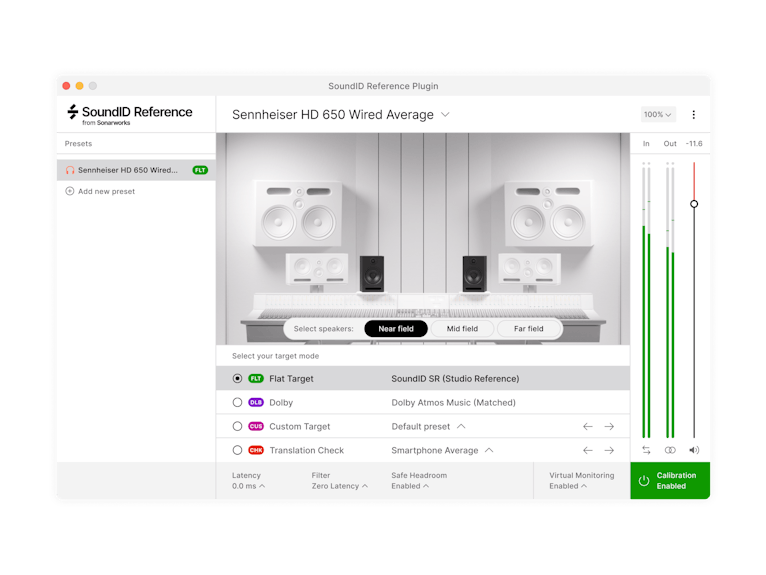
SoundID Reference is a standalone app and a DAW plugin that calibrates speakers and headphones to deliver an accurate studio reference sound. Made for audio engineers, producers, musicians, DJs, composers, sound designers, game developers, and audiophiles.
SoundID Reference ensures perfect translation so you can create music that sounds great on phones, laptops, earbuds, or wherever else its played. By working with the same reference sound with your colleagues and clients, you can save time and money, no matter the distance or gear you have.
How it works?
Even the best speakers can't compensate for the acoustics of a poorly designed room. SoundID Reference compensates for that by measuring the frequency response of your room and speakers to create a calibration profile. For headphones - simply apply a pre-made calibration profile available in the software. With calibration applied, your music will sound great everywhere.
DAW plugin and standalone app
Works in all major DAWs as a plugin and as a standalone Systemwide app calibrating audio across your entire system.
Save time with translation check
Simulate a wide range of listening environments, from a car stereo to a high-end hi-fi system. This allows you to fine-tune your mix to sound great no matter where it's being played.
Ability to control target curve and modes
Make custom adjustments to the target curve in real time and manually select the frequency range that the calibration will be applied to. Various target modes - select flat to set the frequency response target to be neutral across all frequencies, create your presets or work on Dolby Atmos music target curve.
Zero latency processing
Select between different filter processing modes - zero latency for live tracking, mixed for greater flexibility, or linear phase to ensure there's no phase distortion.
Virtual Monitoring Add-On
Realistic simulations of high quality near, mid and far field speakers calibrated to the reliable flat reference sound. Spatial simulations of consumer devices such as cars, laptops, TVs and a smartphone.
Download SoundID Reference v5.9.0.37 for WindowsSonarworks, SoundID Reference, VST Plugins, VST2 Plugins, VST3 Plugins, AAX Plugins, Standalone, 64 Bit Software


All software listed on this site is provided for educational and testing purposes only. We strongly encourage users to support the developers by purchasing official licenses from the original creators. If you find this software useful, please consider buying it legally.

Comments 54