Explore a wide collection of applications, tools, and plugins including audio production, video editing, graphic design, development and productivity software.
Homepage » Software » Windows » Audio Tools » Digital Audio Workstation » REAPER v7.77 for Windows
How to Download from 4download.net Quick step-by-step video guide for new users.
Watch Guide
Download REAPER v7.77 for Windows

Do Anything

Record, edit, mix, master, and produce audio with a professional DAW trusted by musicians, studios, broadcasters, educators, and game developers. One fully featured edition with no artificial limitations.

Constant Evolution

Receive frequent free updates with bug fixes, workflow improvements, and powerful new features. Every update preserves your settings while maintaining excellent forward and backward compatibility.

Feature Highlights

Enjoy advanced multitrack audio and MIDI editing, flexible routing, automation, scripting, surround support, and compatibility with VST3, AU, CLAP, LV2, DX, and thousands of third-party plugins.

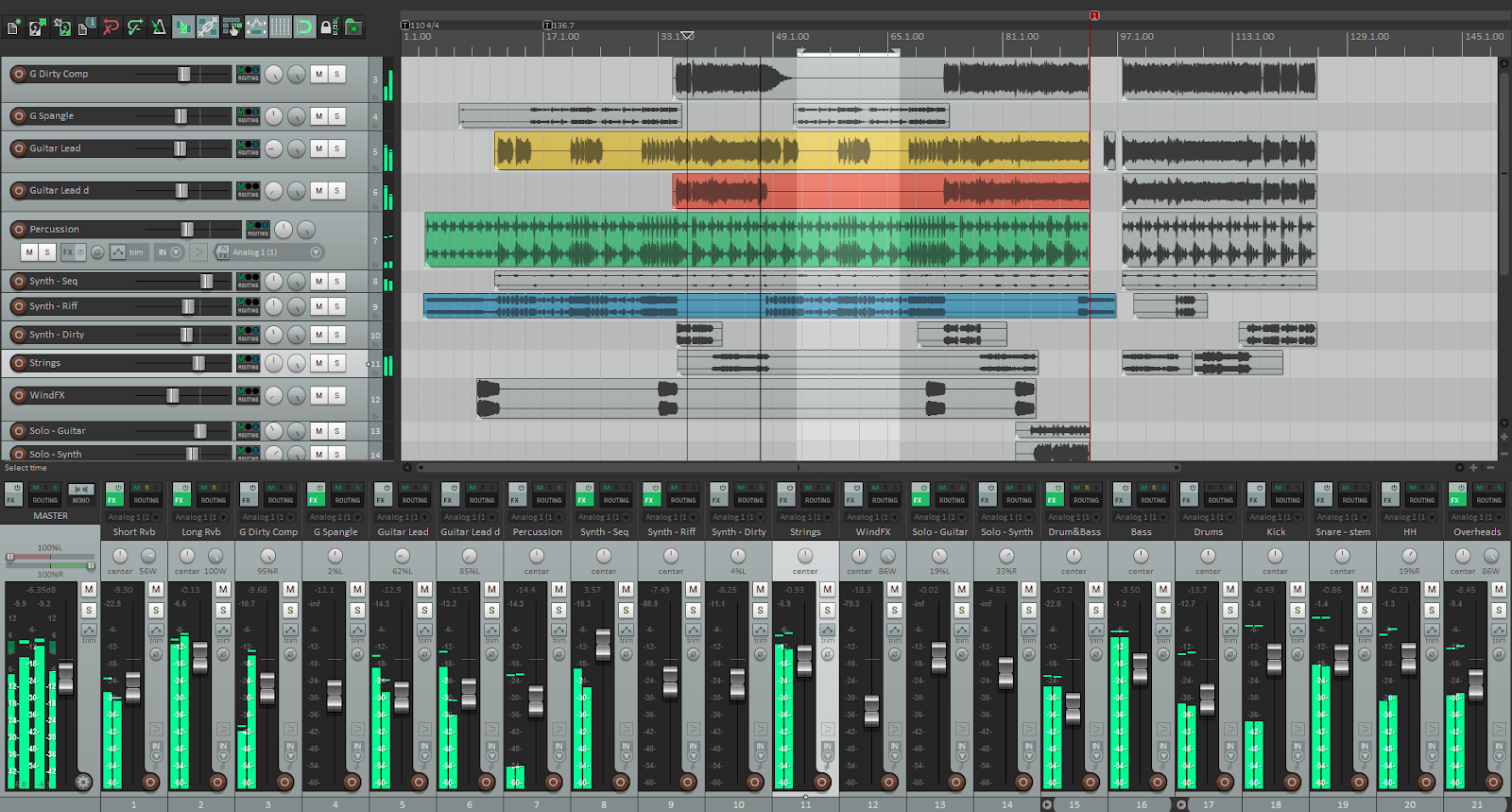
Cockos REAPER is an advanced and complete digital audio production software for multi-track audio recording, mastering and production. The software allows you to edit songs, assigned tracks, and batch conversion. Cockos REAPER Full offers a flexible and complete toolset for MIDI and audio recording, mastering, editing, mixing, and audio processing. Cockos REAPER (stand for: Rapid Environment for Audio Production, Engineering, and Recording) allows you to import a variety of audio and MIDI files, synthesize, compose, arrange, mix, pitch, edit, and master songs.

Cockos REAPER Full Version allows you to record and overdub audio and MIDI files with dozen supported audio formats at any bit rate, record multiple layers or record in a loop. REAPER can open multiple projects at the same time, record stereo, surround, and multichannel audio files, save the recorded musics simultaneously to multiple disks, drag and drop support, easily to move, trim, split, loop, stretch, pitch, fade, and many more. REAPER comes with new redesigned interface, new significant features, new updates, bug fixes, and feature improvements.

Key Features

Multi-Track Recording
Record unlimited audio and MIDI tracks with professional-grade precision.
Advanced Audio Editing
Edit, trim, split, stretch, fade and arrange audio with non-destructive editing.
Professional Mixing
Powerful mixer with flexible routing, buses, sends and effect chains.
MIDI Production
Complete MIDI recording, editing, sequencing and virtual instrument support.
VST & Plugin Support
Compatible with VST, VST3, AU, JSFX and other professional audio plug-ins.
Automation & Routing
Advanced automation envelopes and flexible signal routing for any workflow.
Media Format Support
Import, export and render a wide variety of audio and MIDI file formats.
Fast & Lightweight
Optimized for high performance with fast startup and low system resource usage.

Frequently Asked Questions

What is REAPER DAW?
REAPER is a professional Digital Audio Workstation (DAW) developed by Cockos for recording, editing, mixing, mastering, MIDI sequencing, and audio production. It is well known for its lightweight installation, extensive customization options, fast performance, and support for VST, VST3, AU, and JSFX plugins.
Is REAPER available for Windows, macOS, and Linux?
Yes. REAPER supports all major desktop operating systems. You can download REAPER for Windows, REAPER for macOS, or REAPER for Linux. You can also browse all REAPER releases available on our website.
Is REAPER good for beginners?
Yes. Although REAPER offers advanced features for professional users, beginners can quickly learn the basics thanks to its intuitive interface, active community, and thousands of free tutorials. As your skills grow, REAPER provides deep customization and advanced production tools without limiting your workflow.
What plugins does REAPER support?
REAPER supports VST, VST3, AU (macOS), LV2 (Linux), DX, and its built-in JSFX plugins. It is compatible with most third-party virtual instruments and effects, making it suitable for music production, podcast editing, sound design, and professional mixing.
Can REAPER record and edit MIDI?
Absolutely. REAPER includes powerful MIDI recording and editing features, including piano roll editing, MIDI automation, quantization, velocity editing, drum programming, MIDI routing, and support for external MIDI controllers.
Why do many producers choose REAPER?
Many musicians, producers, and audio engineers choose REAPER because it is lightweight, highly customizable, frequently updated, and capable of handling professional recording, mixing, mastering, podcast production, film scoring, and live audio workflows with excellent stability.
Where can I download the latest version of REAPER?
You can download the latest versions of REAPER for Windows, macOS, and Linux from our REAPER collection. Visit all REAPER downloads to find the newest releases, updates, and previous versions.
HOW TO INSTALL | STEP-BY-STEP GUIDE Quick REAPER v7.77 for Windows Installation Guide
🎬 Media Gallery
WATCH NOW
REAPER v7.77 for Windows

Download REAPER v7.77 for WindowsCockos, REAPER, Audio Editor, Recorder, 32 Bit Software, 64 Bit Software, DAWs

REAPER v7.77 Windows.rar
32.8 MB | Download Link | Pass: www.4download.net
DOWNLOAD NOW
Premium Membership Direct Download Available Unlock high speed & instant access 🚀
Download Previous version
DISCLAIMER

All software listed on this site is provided for educational and testing purposes only. We strongly encourage users to support the developers by purchasing official licenses from the original creators. If you find this software useful, please consider buying it legally.

Fake MailZ: Fake Email Generator

Comments 55

Welcome to the 4Download Community
Please keep discussions respectful, helpful, and relevant to this software. Share your experience, ask questions, or help other users with useful information.
Information
  1. sikiras
    sikiras Guest
    31 January 2026 12:22
    thanx a lot
  2. Domenico
    Domenico Guest
    16 December 2025 00:41
    Gentilmente se possibile Acoustica Mixcraft 10 Pro Studio funzionante, grazie sempre, buona giornata
    1. zardoz
      zardoz Guest
      4 February 2026 20:51
      Nadie ha logrado descifrar Mixcraft 10 hasta ahora
  3. ayoub
    ayoub Guest
    15 December 2025 15:41
    please some one here give me mode pass
    1. Paulo
      Paulo Guest
      21 January 2026 17:59
      www.4download.net
  4. ST Naim
    ST Naim Guest
    1 December 2025 05:45
    Please upload FL Studio Edison, Fruity Reverb 2, Fruity Delay 2 and 3.
    1. gay
      gay Guest
      11 March 2026 23:01
      are you stupid those are only on fl studio
      1. sbu
        sbu Guest
        27 March 2026 08:26
        Why are you gay?
  5. nza
    nza Guest
    24 November 2025 22:25
    thank you! if possible please can you upload Bitwig and ReNoise ?
  6. yesuf
    yesuf Guest
    23 November 2025 05:55
    Please upload the Sonic Atlas plugin.
  7. yasien trabih
    yasien trabih Guest
    23 November 2025 05:39
    FL Studio 2025.2 please and cubase 15
  8. CAOS DLX
    CAOS DLX Guest
    22 November 2025 13:51
    we need a new pro tools pls
  9. xvk
    xvk Guest
    22 November 2025 06:32
    cubase 15, please
  10. kazi
    kazi Guest
    22 November 2025 03:24
    Admin soothe 2.and oeksound bloom plugin.
    I can’t see it on your website.
8

🚫 AdBlock Detected

To continue download, please disable your AdBlock:

Save to My Library